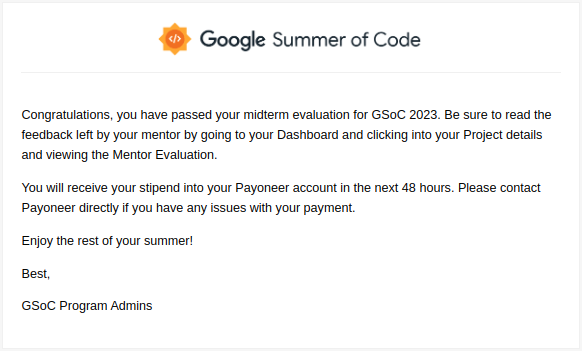
Finally, On July 14, I received this email about passing the midterm evaluation 🎉🎉.
You can check out the blog on the phase 1 report here: https://blog.circuitverse.org/posts/tanmoy_sarkar_phase_1_report/
You should check other blogs here: https://blog.circuitverse.org/
These two weeks were full of debugging and much more learning. Finally, many issues were resolved in these weeks. So, let's get started.
Week 7
RBS Rails
Finally, the rbs_rails issue was resolved. Discussion thread here.
The main issue was this -
The project previously uses ActionMailer for notifications. While migrating to Noticed Gem, we can't use the same table for notifications as we don't want to drop the data. So used has_noticed_notifications to override the model name to use NoticedNotifications the table.
There were some associations -
has_many :notifications, as: :notifiable
This line was causing the issue of preventing rbs_rails gem from generating signatures for models.
After replacing the association with
has_many :noticed_notifications
All the issues are fixed!
Running this task rbs_rails:generate_rbs_for_models will generate the signature for models and the signature for dependencies as well.
After this, we can customize those signature files according to our need to add the custom functions we wrote in our models.
As we have previously set up steep gem to verify rbs signature, that speed up the process of writing rbs annotations.
If you haven't yet checked out RBS installation and CI integration with steep, you should check out this blog: https://tanmoy.online/week-4-circuitversegsoc23
The docs provided by RBS https://github.com/ruby/rbs/blob/master/docs/rbs_by_example.md and this blog https://www.honeybadger.io/blog/ruby-rbs-type-annotation/ helps a lot to understand RBS easily.
All PR: https://github.com/CircuitVerse/CircuitVerse/issues/3792
Week 8
This week's main target was to work on Remote Development Platform integrations.
Many changes have been made in the development environment over the last few weeks. So it was necessary to verify the Gitpod setup and integrate new features. As well as integrate Github Codespaces for Remote Development.
We also will look into the improvement of docker-based local development.
Gitpod Remote Development
There is already gitpod setup in the project, but it has broken due to old version of Redis.
Universal APT repository hasn't the latest version of Redis, and sidekiq requires Redis > v7.0. So we added the Redis repository and gpg key, and it was fixed.
curl -fsSL https://packages.redis.io/gpg | sudo gpg --dearmor -o /usr/share/keyrings/redis-archive-keyring.gpg
echo "deb [signed-by=/usr/share/keyrings/redis-archive-keyring.gpg] https://packages.redis.io/deb $(lsb_release -cs) main" | sudo tee /etc/apt/sources.list.d/redis.list
apt-get update && apt-get install redis
Now the GitPod is running, but it's missing all extensions.
After searching, I found that, due to Microsoft's latest Terms & Conditions, external editors or open source VSCode alternatives like VsCodium or Theia IDE can't use Visual Studio Marketplace to fetch Extensions. So there comes Open-VSX Registry, which hosts and distributes VSCode Extension without restriction. For more details, read this blog https://www.gitpod.io/blog/open-vsx
So we move the extensions from Visual Studio Marketplace to Open-VSX Registry.
vscode:
  extensions:
    - dbaeumer.vscode-eslint
    - rebornix.ruby
    - castwide.solargraph
    - wingrunr21.vscode-ruby
But some extensions like Ruby debugger & Ruby Rubocop Revived The extension is still not available on Open-VSX Registry. So here is the workaround, we can generate VSIX file and provide the links.
We can generate VSIX files very quickly.
Clone extension repository & do
npm installInstall vsce plugin
npm install -g @vscode/vsceRun
vsce packageto generate vsix fileNow, we can upload it somewhere and provide the URL in the extension list.
For more, check this PR: https://github.com/CircuitVerse/CircuitVerse/pull/3892/
Github CodeSpaces Remote Development
Currently, the repository has no Github Codespace configuration so that we will introduce that.
Github Codespaces call this dev container, and we need the dev container configuration to be available to launch the project in the Github Codespaces environment.
We need a docker compose-based setup for our use case because we need Redis & PostgreSQL as databases to start the project.
This documentation was beneficial to understand the configuration - https://docs.github.com/en/codespaces/setting-up-your-project-for-codespaces/adding-a-dev-container-configuration/introduction-to-dev-containers
First, we create a Dockerfile, which will hold only the Environment to run our project.
  FROM ruby:3.2.1
  # install dependencies
  RUN apt-get update -qq && apt-get install -y imagemagick shared-mime-info libvips && apt-get clean
  RUN curl -sL https://deb.nodesource.com/setup_14.x | bash \
   && apt-get update && apt-get install -y nodejs && rm -rf /var/lib/apt/lists/* \
   && curl -sS https://dl.yarnpkg.com/debian/pubkey.gpg | apt-key add - \
   && echo "deb https://dl.yarnpkg.com/debian/ stable main" | tee /etc/apt/sources.list.d/yarn.list \
   && apt-get update && apt-get install -y yarn && rm -rf /var/lib/apt/lists/* \
   && apt-get update && apt-get -y install cmake && rm -rf /var/lib/apt/lists/* \
   && apt-get update && apt-get -y install netcat && rm -rf /var/lib/apt/lists/
Then we make a
docker-compose.ymlfile that will contain the service's detailsversion: "3.1" services: db: image: postgres environment: POSTGRES_DB: circuitverse_development POSTGRES_PASSWORD: postgres web: build: context: . dockerfile: Dockerfile ports: - "3000:3000" depends_on: - db - redis environment: REDIS_URL: "redis://redis:6379/0" CIRCUITVERSE_USE_SOLR: "false" DOCKER_ENVIRONMENT: 'true' command: sleep infinity redis: image: redis:7.0-alpineYou can see the
webservice will start, and Github Codespace will attach to it. To prevent it from terminating, we usedsleep infinitythe commandNow, we require two scripts.
setup.sh -> This script will be called when the container starts. Like database migration, dependency installation, etc.
boot.sh -> After the successful container setup, this script will start the application.
Now, we can write
devcontainer.jsonto complete the setup.{ "hostRequirements": { "cpus": 4 }, "workspaceFolder": "/workspaces/CircuitVerse/", "dockerComposeFile": "docker-compose.yml", "service": "web", "features": { "ghcr.io/devcontainers/features/docker-outside-of-docker:1": {} }, "waitFor": "onCreateCommand", "postCreateCommand": ".devcontainer/setup.sh", "postAttachCommand": { "server": ".devcontainer/boot.sh" }, "customizations": { "vscode": { "extensions": [ "dbaeumer.vscode-eslint", "LoranKloeze.ruby-rubocop-revived", "rebornix.Ruby", "wingrunr21.vscode-ruby", "KoichiSasada.vscode-rdbg" ] } }, "forwardPorts": [3000] }serviceKey takes the service name, which should the process will attach.postAttachCommandKey declares the script, which should will after the setup process.We have also configured various extensions to provide convenience for developers. AS Microsoft powers Github Codespace, we have no issue using the extension from Visual Studio Code Marketplace.
For more details, check this PR: https://github.com/CircuitVerse/CircuitVerse/pull/3894/
Docker-based development environment
I have started working on this. Currently, the setup contains Docker configuration to run the app locally. But this is not suitable for faster development.
I have listed the issues here: https://github.com/CircuitVerse/CircuitVerse/issues/3914
I am trying to rebuild the Docker configuration to build a local environment by using the same concept that Github Codespaces used.
Here is the draft PR: https://github.com/CircuitVerse/CircuitVerse/pull/3913
In the next blog, I will explain these stuffs in detail.
🏂 Thank you for getting it a read
About the author
I am exploring the world of technology and playing with them. Like a kid, breaking them and modiy them.
Comments
Join the discussionGreat Read!