Reactivity in Javascript
In the heart of all modern frontend framework

👀 What is Reactivity?
It's the ability of a piece of code to automatically update or re-render in response to changes in the data it is bound to.
Let's try to understand clearly by ⏬
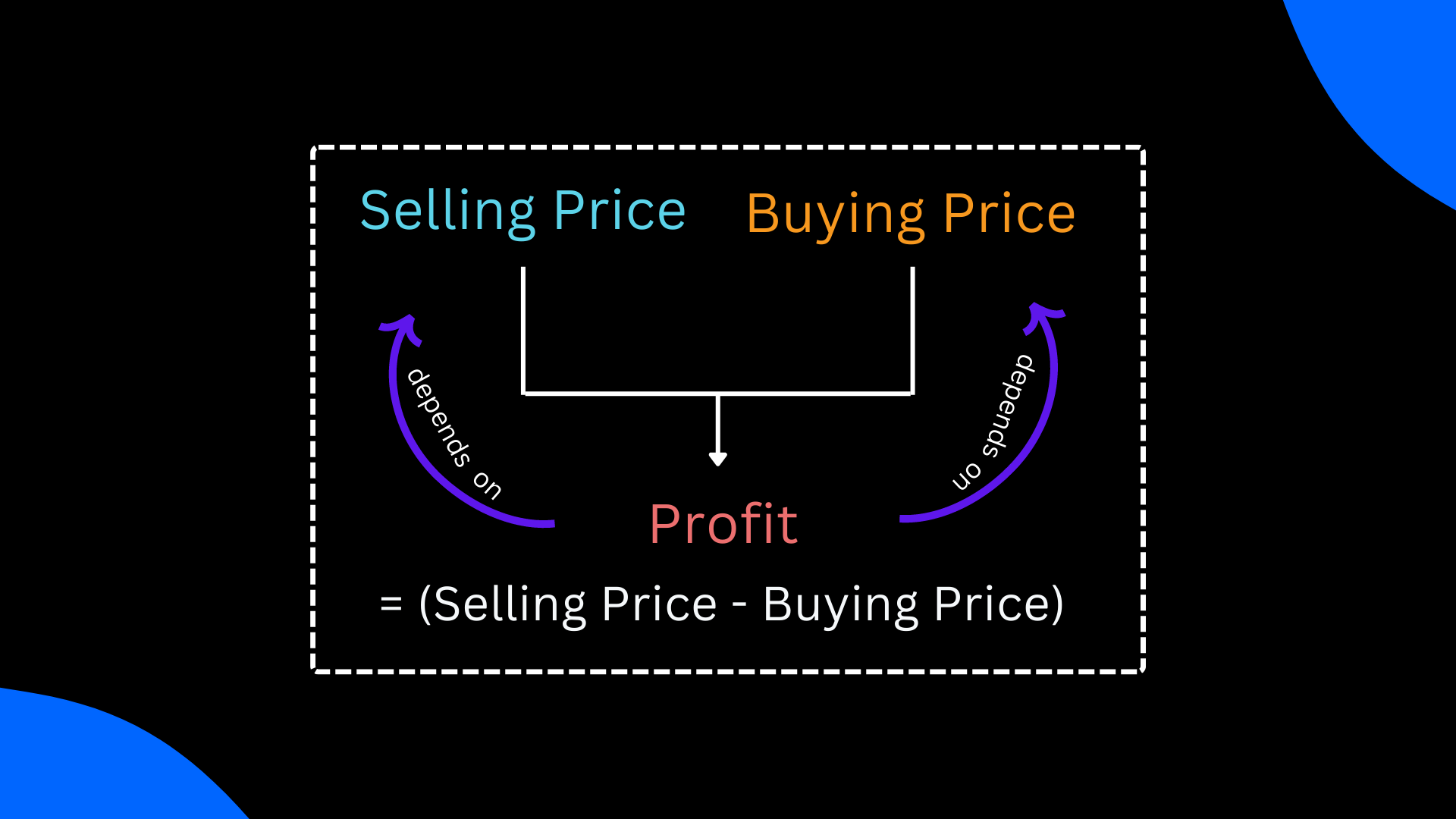
Selling Price and Buying Price are two state variables on which the value of Profit depends.
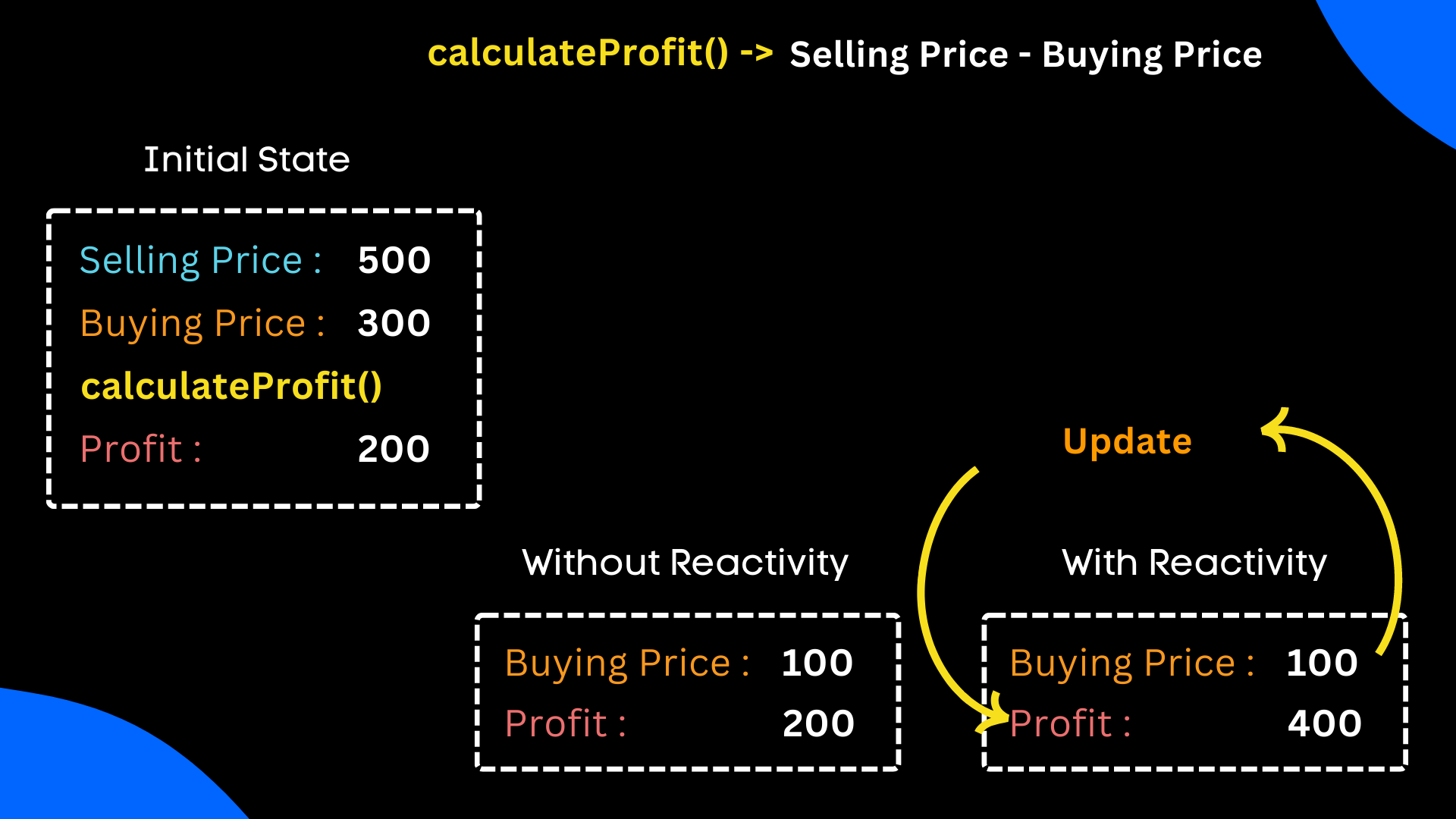
In the case of a Reactive System,
The profit variable will be updated upon any changes in Selling Price or Buying Price.
In the initial state, Selling price is 500 and Buying Price is 300, So the Profit will be (500-300) = 200.
When we update buying Price to 100, the Profit is recalculated automatically and updated to (500-100)=400
In the case of a non-reactive system,
Upon any changes in Selling Price or Buying Price, the profit variable will not be updated until calculateProfit() gets called again.
So, In the initial state, Selling price is 500 and Buying Price is 300, So the Profit will be (500-300) = 200.
When we update buying Price to 100, the Profit remains the same as before. (500-300) = 200
🤔 Where is the Reactivity concept used?
The reactivity concept is in the ❤️ of all modern frontend frameworks (React, Next.js, Vue.js, etc.).
Some important parts where this concept and programming practice are used -
useState hook of React.js
re-render widgets when some bounded state variable got updated
🚀🚀 Let us start building a reactive system
Start with a simple non-reactive system
let buyingPrice = 200
let sellingPrice = 500

let profit;

function calculateProfit(){
    profit = sellingPrice - buyingPrice
}

calculateProfit()
console.log("Profit : "+profit) // Profit : 300

// Update the selling price
buyingPrice = 100

// call calculateProfit() to recalculate
calculateProfit()
console.log("Profit : "+profit) // Profit : 400
Let us begin creating a reactive system
Step 1: Create a Dependency Class
Manage the dependencies, who need to be notified when this data got updated or modified.
class DependancyTracker{
    constructor(){
        this.subscribers = []
    }
    // Register the function of dependent code
    depend(){
        if(target && this.subscribers.includes(target) !== true){
            this.subscribers.push(target);
        }
    }
    // Notify the dependent codes to act on update of this data
    notify(){
        for (let i = 0; i < this.subscribers.length; i++) {
            let func = this.subscribers[i];
            func(); // run the function
        }
    }
}
Let's see that in action
let track = new DependancyTracker();
let profit;
let buyingPrice = 200;
let sellingPrice = 400;

function calculateProfit(){
    profit = sellingPrice - buyingPrice
}

// Register the depndent code
target = calculateProfit
track.depend()
target()

// Initial profit
console.log("Profit : "+profit) // Profit : 200

// Update the selling price
sellingPrice = 500

// Notify all the dependent codes for re-compute
track.notify();
// calculateProfit is also an part of the dependent codes.

console.log("Profit : "+profit) // Profit : 300
Step 2: Play with the getter and setter
A dictionary to store initial values
const data = {
    "buyingPrice" : 200
}
Let's set getter and setter for the specified key
let internalvalue = data.buyingPrice;

Object.defineProperty(data, "buyingPrice", {
    get: function() {
        console.log("Get trigerred");
        return internalvalue;
    },
    set: function(val) {
        internalvalue = val;
        console.log("Set trigerred")
    }
})
Let's see that in action
data.buyingPrice=900
console.log(data.buyingPrice)
Output -

Step 3: Create a watch function to make the process a little bit easy
function watch(func){
    target = func;
    target();
    target = null;
}
Step 4: Wrap up !!!
const data = {
    "buyingPrice" : 200,
    "sellingPrice": 400
}

let target = null;

class DependancyTracker{
    constructor(){
        this.subscribers = []
    }
    depend(){
        if(target && this.subscribers.includes(target) !== true){
            this.subscribers.push(target);
        }
    }
    notify(){
        for (let i = 0; i < this.subscribers.length; i++) {
            this.subscribers[i]();
        }
    }
}

Object.keys(data).forEach(key => {
    let internal = data[key];
    let dep = new DependancyTracker()

    Object.defineProperty(data, key, {
        get: function() {
            dep.depend(); // link target function
            return internal;
        },
        set: function(val) {
            internal = val; // set value
            dep.notify(); // notify dependent variables linked funtion
        }
    })

})

// Watch function
function watch(func){
    target = func;
    target();
    target = null;
}

// Link calculateProfit function in watch
watch(() => {
    data.profit = data.sellingPrice - data.buyingPrice
})

console.log("Profit : "+data.profit) // Profit : 200

data.sellingPrice = 700
console.log("Profit : "+data.profit) // Profit : 500

data.sellingPrice = 900
console.log("Profit : "+data.profit) // Profit : 700
Congratulations 🎉🎉
You may have gained an amazing concept from this blog. If you like it, please share it with your friends.
About the author
I am exploring the world of technology and playing with them. Like a kid, breaking them and modiy them.
Comments
Join the discussionNo comments yet. Be the first to comment.